
Notification preferences
Choose which ApiTraffic emails you receive, from usage warnings and alerts to product updates, and which account emails are always sent.
Choose what ApiTraffic emails you about. Preferences are your own: they apply to you on every account you belong to, and don’t change what your teammates receive.
API health digest
The API health digest is a daily or weekly email summarising traffic, latency, errors and what changed, for the environments and buckets you pick. Owners and admins get a weekly digest of the default environment by default, every Monday at 8:00 AM in their timezone. Members can turn it on here; after a week on the account, the dashboard also offers it until you set it up or select Not now.
Unlike the topics below, the digest is set per account: each account you belong to has its own digest settings.
Open the digest settings
Go to Account → Notifications. The API health digest card is at the top. The Email preferences link in every digest opens it.
Choose when it arrives
Pick Daily or Weekly, the day (weekly only), the delivery time and your timezone. The time is local, including across daylight saving changes. Digests usually arrive within 30 minutes of the time you pick. A time in the two hours after midnight can take up to 2½ hours when our data pipeline is delayed.
Choose what it covers
Tick each environment to include. For each one, choose All buckets, including new ones or pick buckets from the list. At least one environment is needed.
Save
Select Save. To see what you’ll get, select Send me a preview now: it emails you the last complete period for your saved settings. You can send 5 previews an hour.
To stop the digest, set Frequency to Off and save. Your settings are kept for when you turn it back on.
If you unsubscribed from digests with the link in an email, the card says You unsubscribed from digests by email. Select Turn digests back on to receive them again. If the card says Digests are turned off for this account, the decision was made for the whole account and can’t be undone from here.
Links in a digest open the app on the same environment and the same days the email covers.
Change your email preferences
Open Notifications
Go to Account → Notifications.
Switch topics on or off
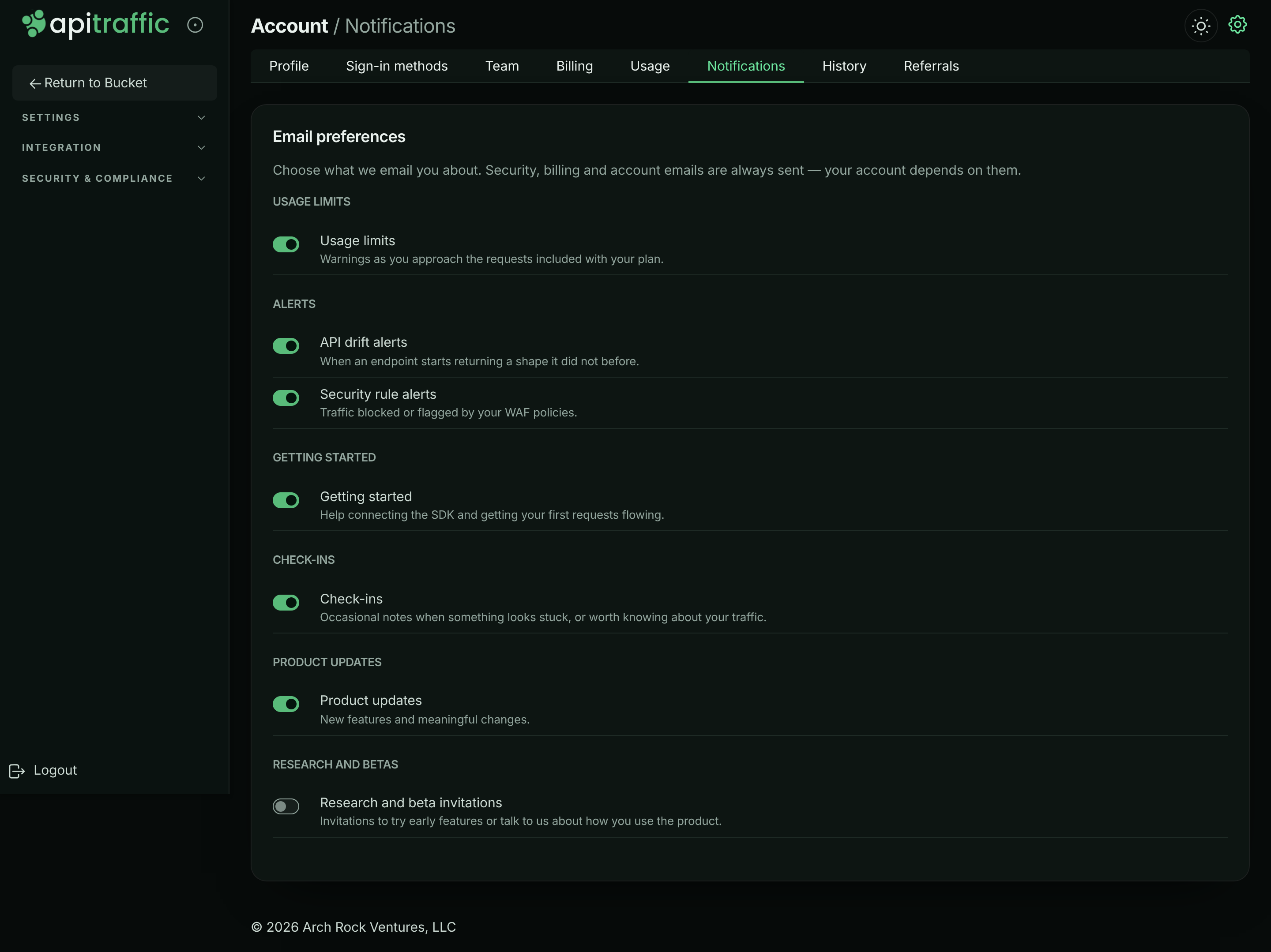
Turn the switch next to a topic on or off. It saves straight away and shows Saved.
Email preferences, grouped by topic.
Confirm important ones
Turning off Usage limits, Reward reminders, API drift findings or Security rule alerts asks you to confirm, because you won’t be told if the thing happens. Select Turn it off to confirm, or Keep it on.
Email topics you can turn off
| Group | Topic | What it covers | Default |
|---|---|---|---|
| Alerts | API drift findings | When an endpoint starts returning a shape it did not before. | On |
| Alerts | Security rule alerts | Traffic blocked or flagged by your firewall policies. | On |
| Usage limits | Usage limits | Warnings as you approach the requests included with your plan, at 80% and 100% of an allowance. The owner’s say what the plan includes and what overage costs; an admin’s say only the share used. | On |
| Billing | Reward reminders | A week before a referral or promotion reward ends: the date, and what changes when it does. Sent to the owner only. | On |
| Getting started | Getting started | Help connecting the SDK and getting your first requests flowing. | On |
| Check-ins | Check-ins | Occasional notes when something looks stuck, or worth knowing about your traffic. | On |
| Product updates | Product updates | New features and meaningful changes. | On |
| Research and betas | Research and beta invitations | Invitations to try early features or talk to us about how you use the product. | Off |
Warning: If you turn off Usage limits, nobody warns you before a hard-capped allowance stops capture or overage starts, or when traffic goes over your ingest rate limit and some of it isn’t recorded. Keep it on unless someone else on the team watches Account → Usage.
Emails that are always sent
Security, billing and account emails aren’t listed, because your account depends on them:
- password resets and confirmations that your password changed,
- email address verification,
- team invitations, and notice when someone accepts one,
- payment problems, when a charge failed and the subscription is at risk.
Unsubscribe links
Optional emails include an unsubscribe link that works without signing in. It turns off that kind of email, or all optional email. A topic that’s off because you unsubscribed from everything shows Off because you unsubscribed from all email. Turn the switch back on here to receive it again.
Notifications outside email
Email isn’t the only way to hear about what happens in your account:
- The account history lists every account action.
- Account activity events can be read from the API to feed your own systems.
- Workflows send alerts about your traffic to your own tools.
Troubleshooting
A topic is off and says Off because you turned off this whole group
The group was turned off, for example from an unsubscribe link. Turn the topic back on here.
I still get invitation or password emails
Those are account emails and are always sent.
Related
-
Plan, usage and billing: What happens when you reach an allowance.
-
Account history: Everything that happened in the account.
-
Account activity events: Read account events from the API.
-
Workflows: Alert your tools about your traffic.