
Compliance evidence for SOC 2 and PCI DSS
Daily evidence of the API controls ApiTraffic can see, mapped to SOC 2, PCI DSS and HECVAT, with exceptions for your audit period and signed evidence packs.
Auditors ask the same questions every year: is the firewall enforcing in production, are vulnerabilities fixed on time, which vendors receive your data, did anything change without review? ApiTraffic already watches these things for your APIs. Compliance records the answer every day, maps it to the controls of the frameworks you are audited against, and packages it as signed evidence your auditor can check.
Compliance covers only the controls ApiTraffic can see in your APIs: the firewall, vulnerabilities in the packages your services run, outbound vendors, certificates, change detection and sensitive data. Your framework has many more (policies, HR, physical security, your infrastructure). Your auditor or compliance platform tracks those.
Before you begin
- Plan: your plan includes Compliance. Evidence packs and Compliance platform push are separate plan features.
- Roles: everyone on the team can see the Compliance pages and download evidence packs. Changing the settings, connecting a compliance platform and mapping controls are for account owners and admins.
- Data: evidence starts on the day compliance is turned on for your account. Days before that are shown as Not assessed, never as a pass.
How evidence is recorded
Every morning, at about 06:00 UTC, ApiTraffic runs each check for the day before (UTC), for the whole account and for each environment:
| Check | Passes when |
|---|---|
| WAF enforcing in production | Every bucket with production traffic has a WAF policy enforcing Request Protection. |
| WAF policy changes logged | Every change to a WAF policy that day has its event in the account history. |
| Outbound protection | Outbound protection is on (Monitor or Enforcing) with the credentials and bulk personal data checks, in production. |
| Package inventory coverage | At least 90% of production instances report a complete package list. |
| Critical and high vulnerability SLAs | No critical, KEV or high finding has been open longer than your SLA (30 and 90 days by default). Open time counts time in accepted risk. |
| Patch window | No critical or high finding with a fix is unfixed more than one calendar month after the fix was released (PCI DSS 6.3.3). |
| Risk acceptances documented | Every accepted risk has a reason and an expiry in the future. |
| Destination watch and review | Destination watch is on for production buckets, and no destination waits for review longer than 14 days. |
| Certificate inventory | Certificate monitoring covers every outbound HTTPS host seen. |
| Drift detection and review | Drift detection is on for production buckets, and no unexplained breaking change is open longer than 7 days. |
| Sensitive data | Discovery is on, no payment, secret, health or government id data (and student data, when Count possible health and student data is on) reaches ApiTraffic unredacted in production, and every destination receiving it is approved. |
| Log retention | Request logs are kept at least 12 months (PCI DSS 10.5.1). |
| MFA required | The account requires MFA for every member. |
Security posture checks (no WAF policy, IP reputation off, members without MFA, unused API tokens, expired or invalid certificates) are reused as they are.
Run the checks now
You don’t have to wait for the next morning. The first time anyone opens Compliance on an account with no evidence yet, the checks run straight away. After that, owners and admins can select Run checks now on the overview at any time. Within a minute or two, today is recorded as it stands so far, and the overview, the frameworks and the checks show it. If yesterday has not been recorded yet (the morning run has not happened), it is recorded first, so no day is missed. The next morning’s run records today again, in full, once it has ended.
Each check is Pass, Attention or Not assessed for the day. ApiTraffic also keeps which records were behind it (the buckets, findings, destinations, certificates or fields it judged) and what each looked like, so evidence for a past day never depends on what is in the app today.
Some checks apply only to production environments. In a non-production environment they are Not assessed, never a pass. Production is decided as on the Destinations page: the environment’s own setting there, or its name. The sensitive data check follows the sensitive data alert and uses the production environments set in the Security Center settings, where an environment named production, prod or live counts unless you set it otherwise.
Frameworks and controls
Each framework maps its controls to checks:
- SOC 2 (2017 Trust Services Criteria): CC6.1, CC6.6, CC6.7, CC6.8, CC7.1 to CC7.4, CC8.1, CC9.2 and C1.1.
- PCI DSS 4.0.1: 3.3.1 and 3.5.1, 4.2.1, 6.3.1 to 6.3.3, 6.4.1 and 6.4.2, 10.2, 10.5.1, 12.5.2 and 12.8.1.
- HECVAT 4.1.6: the questions on application security, vulnerability management, change management, logging, authentication, third parties and data, each with a suggested answer.
A check backs a control as evidence (it shows the control operating) or supporting (it helps, but the control needs more than ApiTraffic sees). A control’s state on a day comes from its evidence checks, or from its supporting checks when it has no evidence checks:
| State | Meaning |
|---|---|
| Pass | Every counted check passed. |
| Attention | A counted check needs attention. |
| Partial | Some passed; the rest had no records that day. |
| Not assessed | No records that day. |
| Records | The control is backed by record exports only (package inventory, alert history, account history): evidence without a pass or fail. |
Counts are always counts of controls, never a percentage: a percentage would suggest ApiTraffic covers your whole framework.
The overview
Select Compliance in the All buckets menu. The overview shows each framework that is turned on, with how many of its controls are in each state on the last day of the period, and the exceptions: every check that was in attention on any day of the period, for how many days, and the day it passed again. Exceptions are what an auditor samples, so this is the list they will ask about.
The Compliance overview for the sample account.
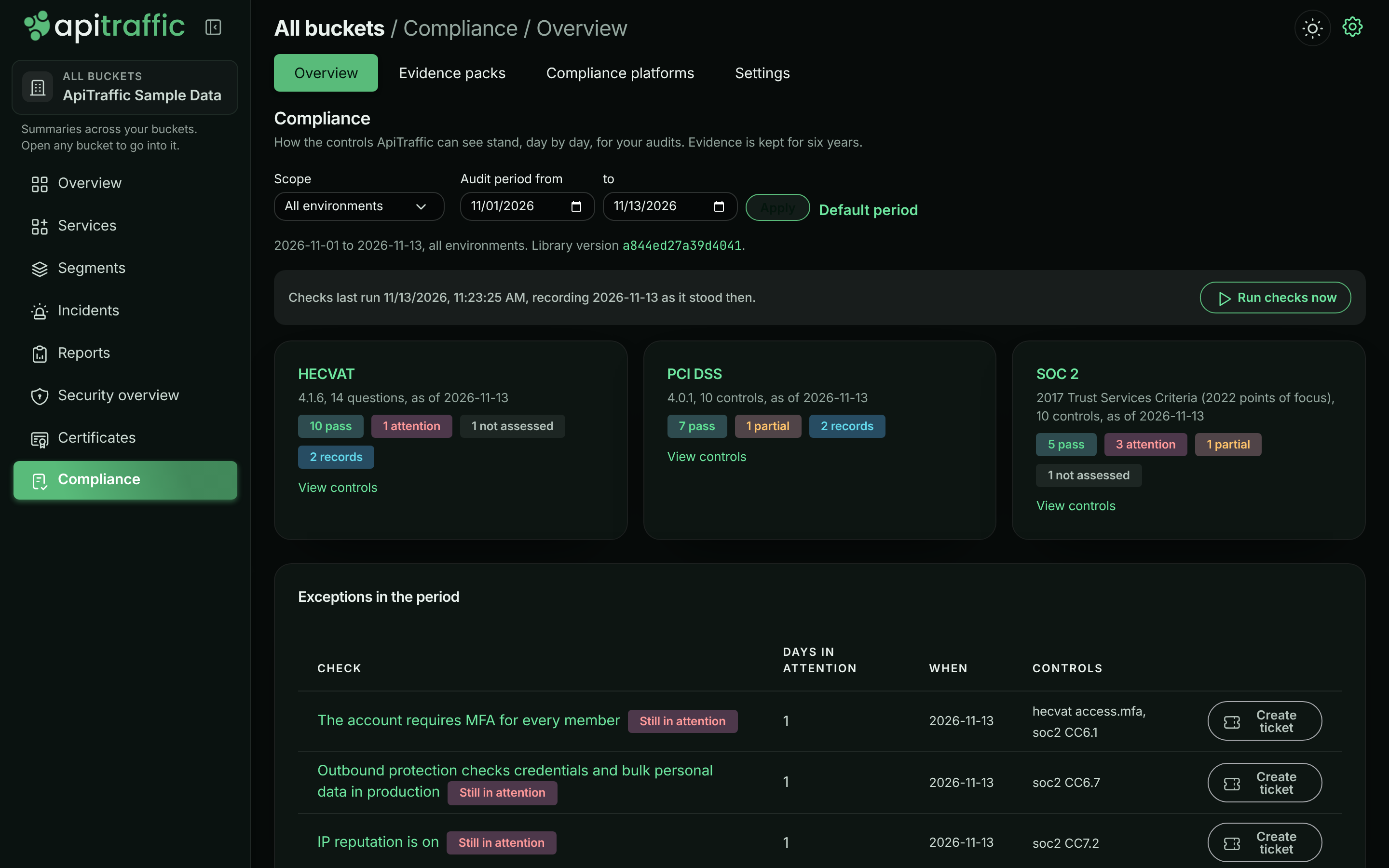
Choose Scope to see one environment’s evidence instead of the whole account, and set Audit period to the period your audit covers. The default period is the one saved in Settings, or the last 12 months up to yesterday, or up to today once the checks have been run today.
Each framework shows how many controls it has. Select View controls to see them, with the checks behind each, even before there is any evidence.
Create ticket on an exception that is still in attention opens a ticket in your tracker with the check, the controls it backs and the records that need fixing (see Work tracking).
A framework’s controls
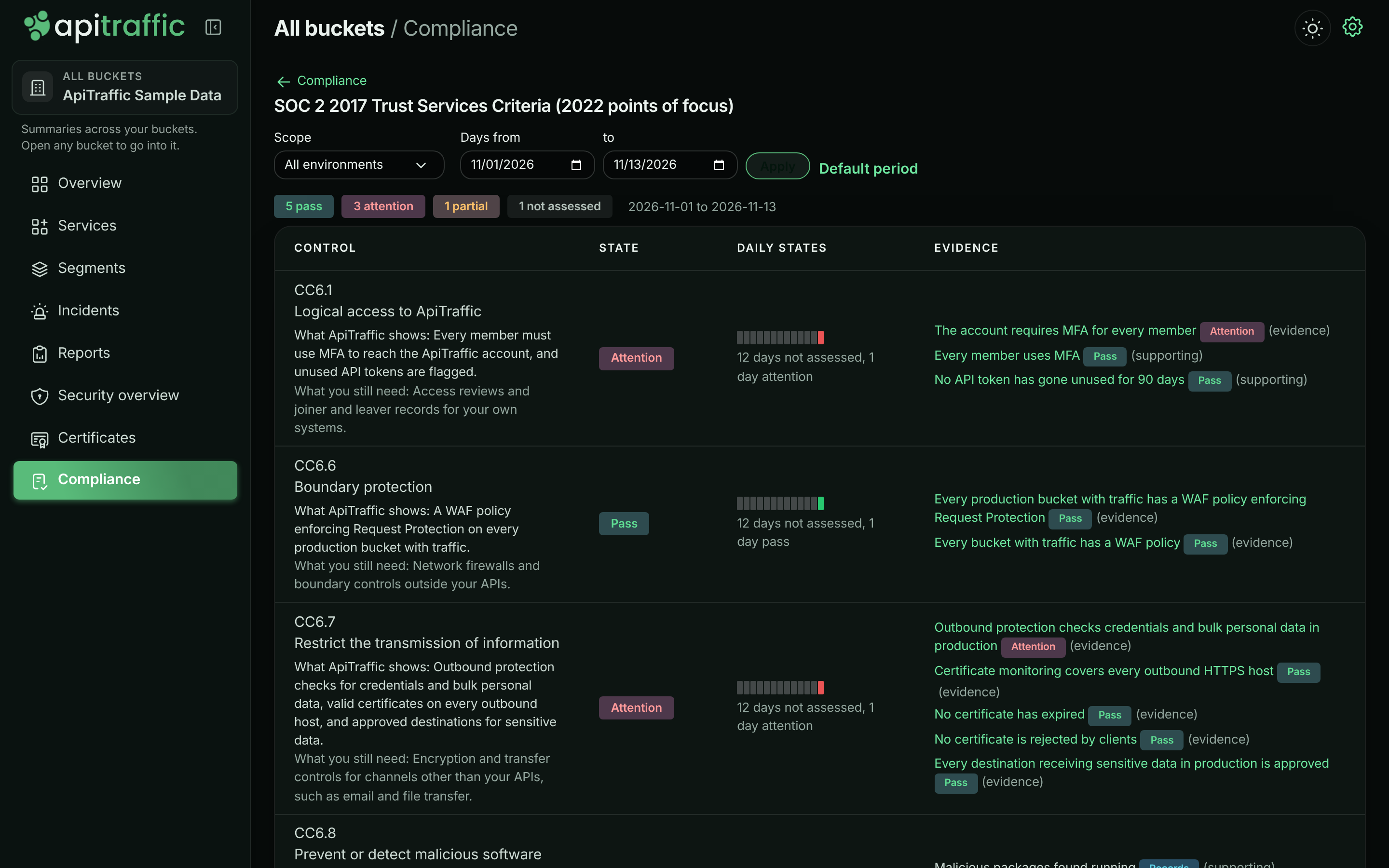
Select a framework to see each control with its state, a strip of daily states across the period (90 days by default), the checks and exports behind it with their coverage, What ApiTraffic shows, and What you still need: the part of the control you cover yourself.
SOC 2 controls with their daily strips.
For HECVAT, each question has a suggested answer for its state. Select Copy and paste it into your HECVAT. Check each answer before you send it: match the question to the one in your copy of the HECVAT workbook, and adjust the wording to your organisation.
One check on one day
Select a check to see its state on a day and the records behind it as they were that day. Pick another day to see how it stood then. Records in attention are listed first.
Evidence packs
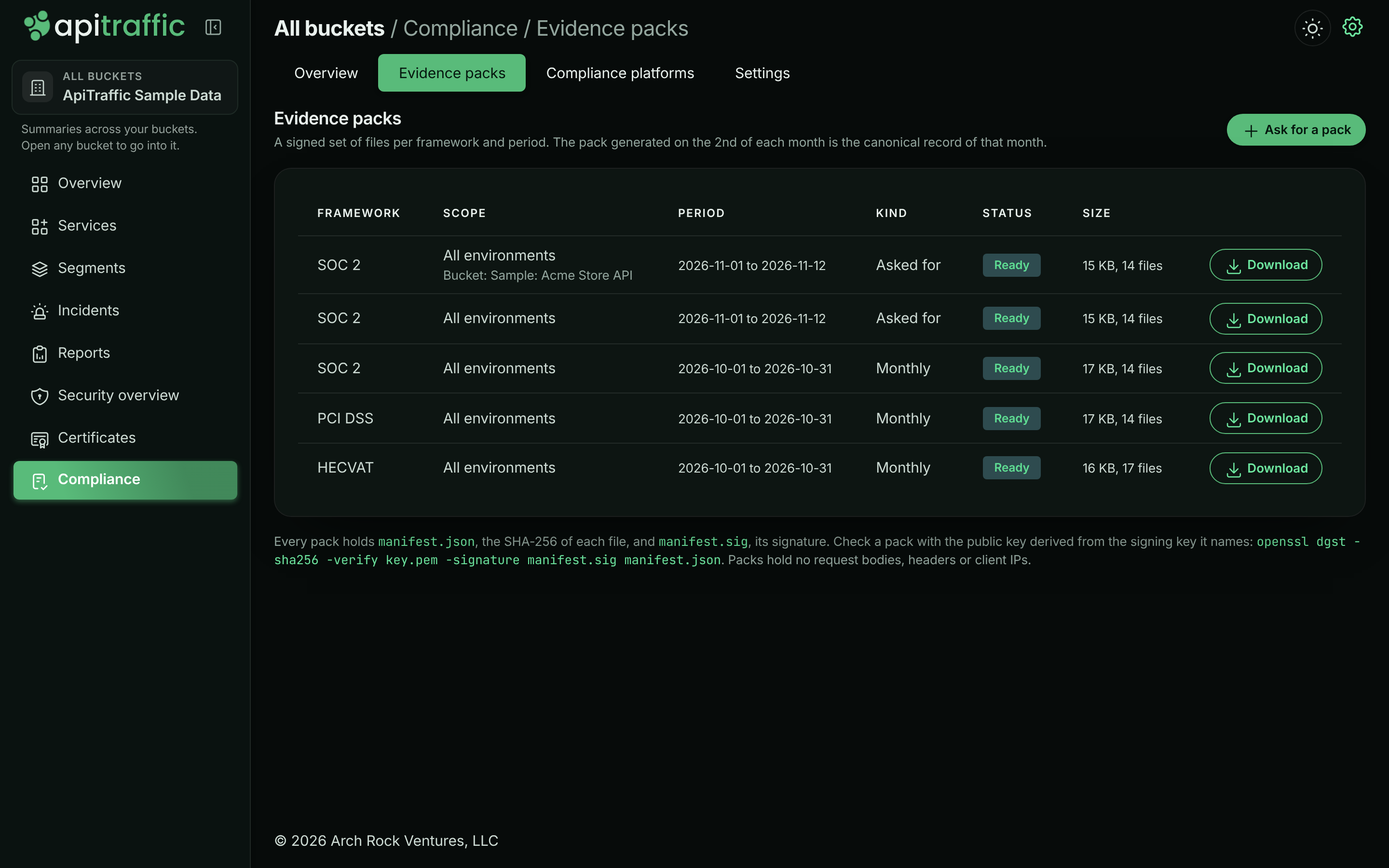
An evidence pack is a zip file for one framework (or all of them) and one period. Open Evidence packs on the Compliance page.
- Monthly packs. On the 2nd of every month, ApiTraffic generates a pack per framework that is on for the previous month, for the whole account, and for each environment listed under Separate packs for in Settings. The monthly pack is the canonical record of that month.
- Packs on request. Select Ask for a pack for any framework, environment and period up to yesterday, within the six years evidence is kept. A pack is built within a few minutes. A pack asked for never replaces a month’s canonical pack.
- Packs for some buckets. When an audit covers only some of your APIs, choose their Buckets when you ask for a pack. The pack holds only those buckets’ records, and each check is judged again from them for every day: a check with no records in those buckets is Not assessed, never a pass. Checks that belong to the whole account, such as MFA, unused API tokens and log retention, keep the account’s state, and the pack’s manifest lists them. Evidence whose record has since been purged can’t be tied to a bucket, so it’s left out, and the manifest counts it.
Evidence packs for the sample account.
A pack holds:
| File | Holds |
|---|---|
summary.pdf |
The cover (account, period, scope, library version, SLAs) and each control with its states, strip and exceptions. |
controls.csv, daily-states.csv, exceptions.csv, notes.csv |
The states behind the summary, day by day. |
records.csv, finding-history.csv |
Every record behind each check in the period, with each version it went through. |
waf-changes.csv |
Every WAF policy and block response change in the period. |
| Record exports | The package inventory, malicious packages, alert history and rules, account history, request log coverage, the sensitive data map and tickets, as they stand when the pack is generated. |
manifest.json, manifest.sig |
The SHA-256 of every file, and a signature over the manifest. |
Packs never hold request bodies, headers or client IP addresses. The sensitive data map lists field paths and data types, never values.
Every download is recorded in the account history, with who downloaded it.
Check a pack’s signature
manifest.sig is an ECDSA P-256 signature over the SHA-256 of manifest.json’s exact bytes. manifest.json names the signing key (signing.keyId). Your auditor verifies it with the public key derived from that signing key, never with anything inside the pack: ask ApiTraffic support for the public key for that key id, or, if you run ApiTraffic yourself, derive it from your signing key with openssl pkey -in signing-key.pem -pubout -out key.pem. With the public key saved as key.pem:
openssl dgst -sha256 -verify key.pem -signature manifest.sig manifest.json
Verified OK means the manifest is the one ApiTraffic signed. Then check each file against the SHA-256 listed for it:
sha256sum summary.pdf controls.csv
How long evidence is kept
Daily evidence and packs are kept for six years while the account is open. Where the storage supports it (Amazon S3 Object Lock), packs are also stored locked, so they cannot be changed or deleted before then, except when you close the account (see below). Storage without Object Lock, such as DigitalOcean Spaces, keeps packs unlocked: they are still kept for six years, and the signed manifest shows any change to a file.
Settings
Open Settings on the Compliance page:
- Frameworks: the frameworks the overview and the monthly packs cover. All of them are on by default.
- Vulnerability SLAs: how many days a critical or KEV finding, and a high finding, may stay open. They are printed on every pack.
- Audit period: the default period of the overview and the exceptions.
- Separate packs for: environments that also get their own monthly pack, which an API token for that environment can download.
- Sensitive data discovery: discovery on or off for the account, and whether possible health and student data counts (see Sensitive data).
Every change is recorded in the account history.
API tokens and MCP
An API token belongs to one environment, so it reads that environment’s evidence and packs only; the whole account’s evidence is for signed-in members and for credentials that are not tied to an environment. A token or MCP connection limited to some buckets cannot read compliance evidence, which is kept per environment, not per bucket. See the Compliance API.
The MCP tools get_compliance_overview and list_compliance_exceptions answer questions like “are we ready for our SOC 2 audit?” from your AI assistant.
Purges and closing the account
- Purging captured traffic removes the evidence copies of the records it deletes (destinations, drift findings, sensitive data fields). Daily states stay: they hold no captured data.
- Purging security findings removes the copies of findings and packages.
- Purging rules and settings removes compliance platform mappings, and the evidence copies of the sensitive data decisions it deletes, but keeps which frameworks are on and the SLAs, so evidence never stops silently.
- Closing the account deletes all compliance evidence and every evidence pack. Download the packs you need, or push them to a compliance platform, before you close the account.
See Account data for every purge kind.