
Watch for new outbound destinations
Get alerted the first time your app calls a host it has never called before, and review every host it talks to so a dependency that calls home is caught quickly.
A package update can quietly start sending data somewhere new: an analytics beacon, a “telemetry” endpoint, or worse, a compromised dependency calling home. Destination watch keeps a list of every host each bucket’s app calls out to. The first time it calls a host it has never called before, the host goes into a review queue and an alert fires. You approve the hosts you expect and flag the ones you don’t.
Destination watch only observes. It never blocks a call.
Before you begin
- Plan: destination watch needs a plan that includes Outbound destination watch.
- SDK: hosts are learned from the outbound calls the SDK records (see Outbound requests), and from
http.outspans when APM is installed. Calls the SDK can’t see (a native addon, another process) can’t be watched. - Roles: any team member can approve, flag or reopen a host. Turning watch on or off, rules, pruning and choosing production environments are for account owners and admins.
Turn on destination watch
Watch is off for every bucket until an admin turns it on.
Open the Destinations page
Choose Protect → Destinations.
Choose what happens to hosts you already call
An app that is already running calls dozens of hosts, so turning watch on first imports the hosts from the last 30 days:
- Approve hosts from the last 30 days (the default) starts you with an empty queue. Hosts with a risk reason (see below) still go to the queue.
- Review every host from the last 30 days puts every one of them in the queue.
Select Turn on
The import runs in the background and takes at most 30 minutes. Alerts for new hosts wait until it finishes, so the import’s hosts don’t alert as new; a risky host alerts straight away. The import reads outbound requests, so a host seen only in APM spans during that time can’t be checked against it: those go into one summary alert instead of one each.
Turning on destination watch for a bucket.

Turning watch off stops new alerts for the bucket and resolves its open destination alerts. The hosts and their review status are kept.
Review the queue
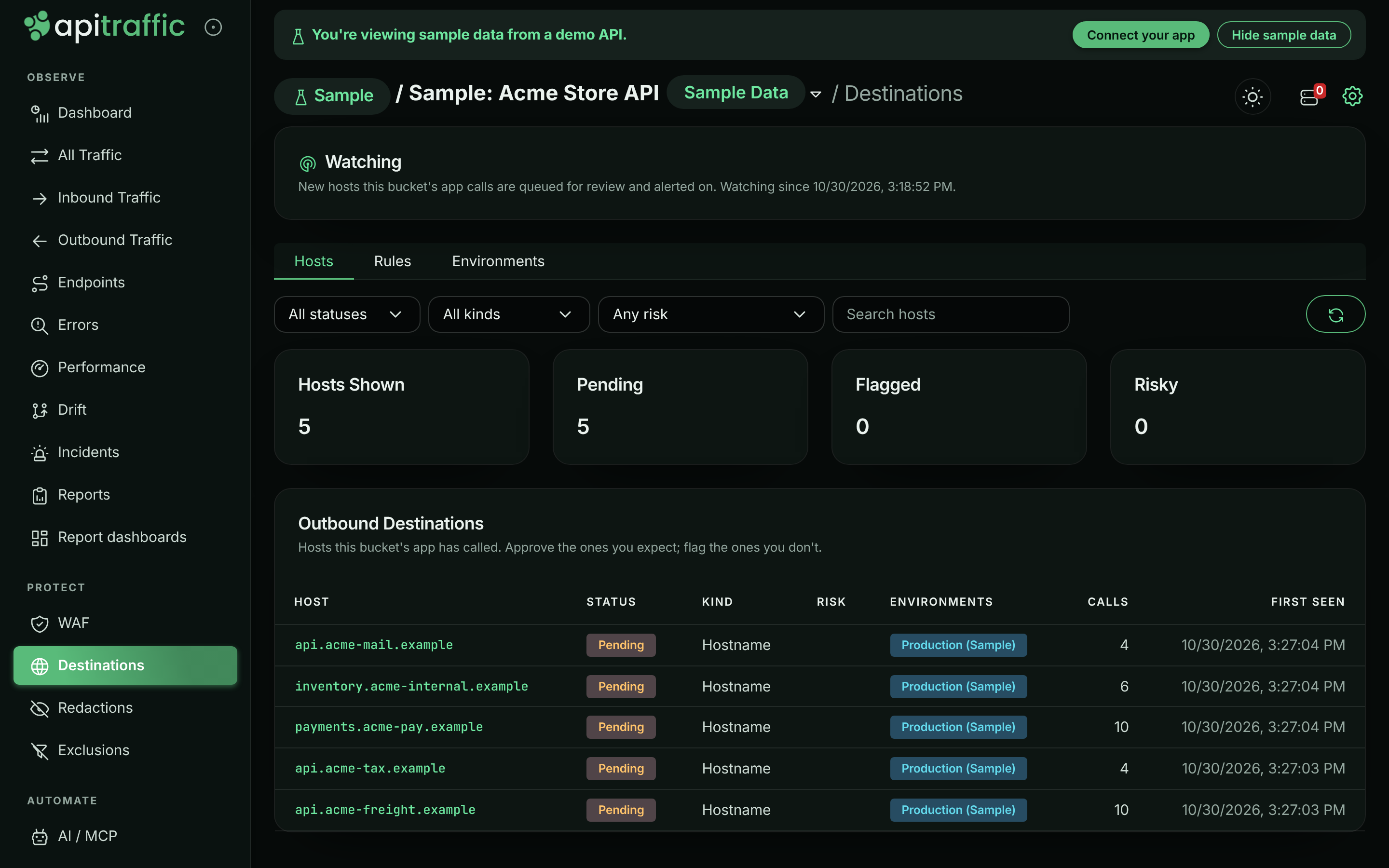
The Hosts tab opens on Needs review: every pending and flagged host for the bucket. Each row shows the host, its status, any risk reasons, the environments that called it, how many calls were seen and when it was first seen.
Every host the sample Acme Store API calls.
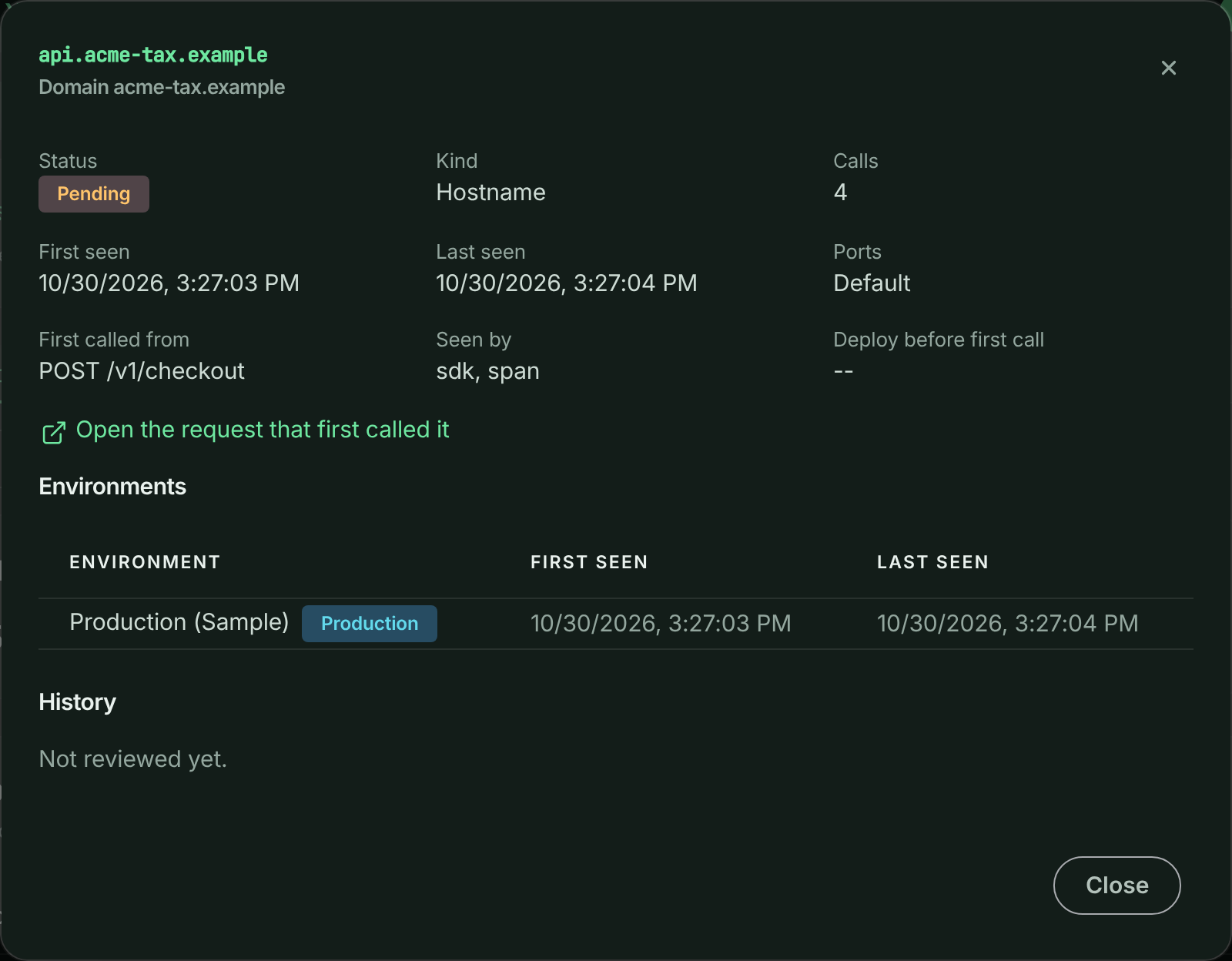
Select a host to see:
- Why it stands out, when it has a risk reason.
- First called from: the inbound route whose handler made the first call, when the call was seen inside a request. A host first seen on its own outbound record shows Not recorded, and one found by the 30-day import shows Found by the history import. Open the request that first called it shows that request in the traffic log.
- Deploy before first call: the deploy event in the hour before the host was first called, when there was one. A new host straight after a deploy usually came with that deploy.
- Environments that called it, with production marked.
- History: who approved, flagged or reopened it, and when.
Then:
- Approve a host you expect. Its alerts resolve.
- Flag a host you don’t. A note saying why is required. A flagged host alerts at critical severity. The alert stays open while the host is still being called, and resolves once it has gone 24 hours without a call or someone approves it.
- Reopen puts an approved or flagged host back in the queue.
To approve many hosts at once, tick them in the list and select Approve. A bulk approval is all or nothing: if one host can’t be approved, none are.
Reviewing one host.
Risk reasons
Some hosts are worth a second look whatever they are. These are never approved by a rule or by the 30-day import, and they alert at critical severity:
| Reason | Raised when |
|---|---|
| Called by IP address | The app called a public IP address instead of a hostname. |
| Unusual IP encoding | The address was written in a form meant to slip past filters, such as 0x8.0x8.0x8.0x8 or 134744072 for 8.8.8.8. |
| Cloud metadata endpoint | The app called a cloud provider’s instance metadata service (for example 169.254.169.254), which hands out credentials. |
| Non-ASCII hostname | The hostname uses non-ASCII characters, which can imitate a familiar name. |
| Non-standard port | The host was called on a port other than 80 or 443. |
| Matches a flag rule | An admin’s flag rule covers the host. |
Calls to localhost and private network addresses (10.x, 192.168.x and so on) are listed but don’t alert: they are your own services. The exception is a disguised one, such as 0x7f.1 for 127.0.0.1: that is how requests get past filters meant to block internal addresses, so it alerts.
Alerts
A new host opens an alert through your alert routing, like any other incident:
| Host | Severity |
|---|---|
| Flagged, or with a risk reason | Critical |
| First called from a production environment | Warning |
| First called from any other environment | Info |
There is one alert per host for production and one for everything else, so a host that reaches production after being seen in staging alerts again at the higher severity. When more than five new hosts appear in a bucket at once (a large dependency upgrade, say), they are grouped into one alert instead of one each.
Destination alerts are security alerts: they are never grouped into the same incident as performance or error alerts.
Rules
Rules approve or flag hosts automatically, across every bucket in the account. They are on the Rules tab.
- A pattern is an exact host (
api.stripe.com) or a domain and everything under it (*.stripe.com). - Flag beats approve. A host matching both is flagged.
- An approve rule never approves a risky host.
- A flag rule can cover a whole top-level domain (
*.zip,*.top). An approve rule can’t. - An approve wildcard never covers shared hosting. Anyone can create a host under suffixes such as
herokuapp.com,vercel.appors3.amazonaws.com, so*.herokuapp.comis refused. Approve those hosts one at a time.
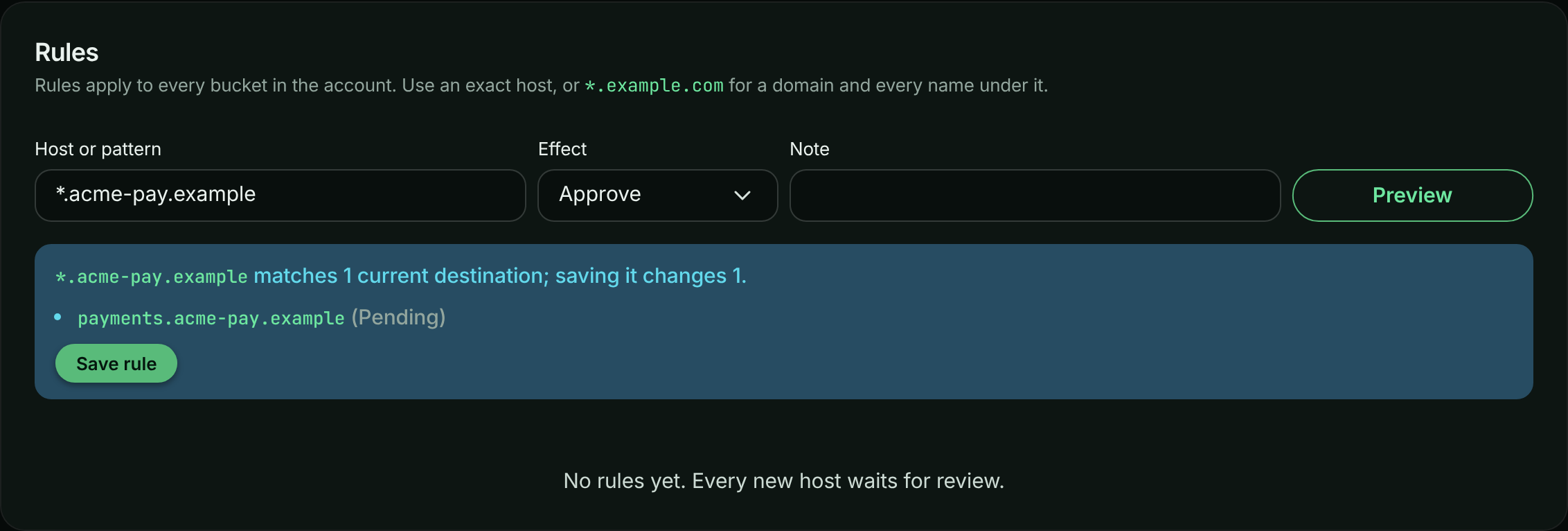
Select Preview to see how many current hosts the rule matches and how many it would change before you save it. Saving applies it to existing hosts straight away: a flag rule flags every matching host; an approve rule approves the matching pending ones. Deleting a flag rule leaves the hosts it flagged flagged.
A host a flag rule flagged can only be approved by an account owner or admin.
Previewing an approve rule before saving it.
Production environments
A host first called from production alerts at a higher severity, so destination watch needs to know which environments are production. Until an admin chooses, an environment counts as production when a word in its name is prod, prd, production or live, and no word is one like staging, test, dev, qa or preprod. So production and prod-eu count; pre-prod and staging don’t. On the Environments tab, switch any environment on or off; a choice made there is kept and never replaced by the name.
Limits
- Up to 5,000 hosts are tracked per bucket and 50,000 per account. Past that, new hosts are not added and one alert says so.
- At most 50 risky hosts per bucket per hour alert one by one; past that, one alert covers the rest.
- Up to 16 non-standard ports are kept per host.
- Call counts are approximate.
Related
- Outbound requests: how the SDK records the calls your app makes.
- Alerts: incidents, routing and silences.
- Outbound destinations API: the same queue, rules and settings over the REST API.
- Webhook events:
security.destination_*events for every review, rule and watch change.